Every voice lesson, split into clips you can actually practice.
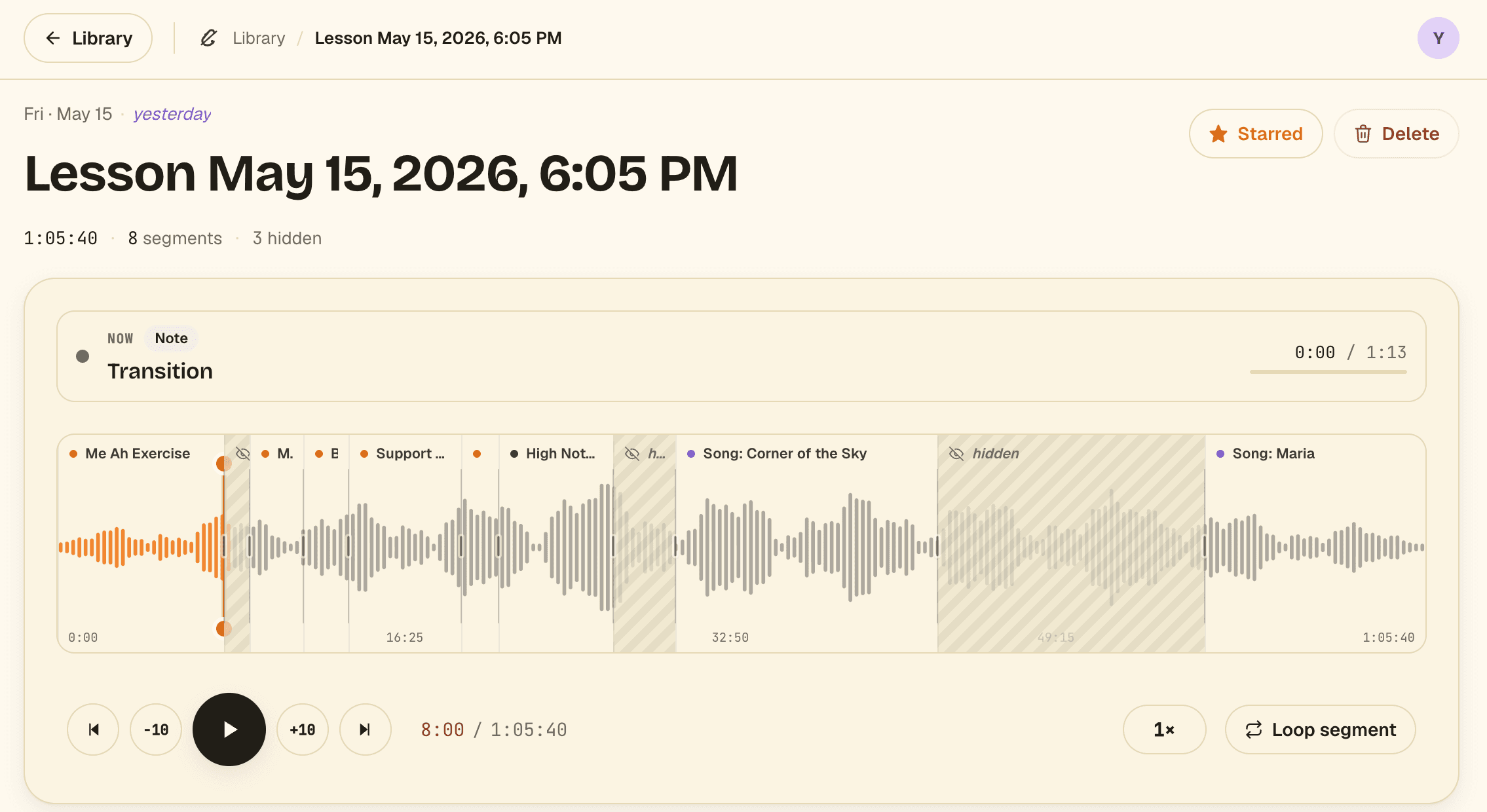
Upload the recording from your last lesson. In about 40 seconds, Segno splits it into named clips for every warm-up, exercise, and song. Loop the hard parts, slow them down, and practice the exact spots that need work, not the whole hour-long recording.
From recording to practice plan in three steps.
No timestamping, no note-taking, no "I'll listen back later." Upload it once and the lesson sorts itself.
Upload your lesson recording
A voice memo, a phone recording, or the audio from a Zoom lesson, anything up to 90 minutes. Drop it in right after your lesson and put your phone away.
voice memo · zoom · any audioSegno splits it into clips
In about 40 seconds, Segno splits the lesson into named clips: warm-ups, scales, the run-through of that one phrase. Not quite right? Drag the edges, rename, or merge clips, and your edits are saved for next time.
yours to fine-tunePractice the parts that matter
Tap any clip to jump straight to it. Loop it, slow it to 0.75×, and star the few you'll work on this week.
loop · slow · starEverything from your lesson, named and a tap away.
Loop one phrase until it's right
Set A → B markers on any clip. Loop the tricky bar, slow it to 0.75×, and repeat until your ear is happy.
Star what to practice this week
Mark the exercises and songs you're focusing on. They surface first in your library, so practice starts the moment you open Segno.
Find any moment, fast
Search across every lesson by exercise name or note. "That high run from last month" is one tap away.
Edit in seconds
The first pass won't be perfect, and it doesn't need to be. Drag a boundary, rename a clip, merge two takes. It feels like scrubbing a recording, and every edit is saved for next time.
Good to know.
Are my recordings private?
Completely. Your lessons are visible only to you. We don't share them, and we never sell your data. Your teacher's voice and yours stay between you.
How accurate is the auto-splitting?
It gets you a solid first pass in about 40 seconds, and it keeps getting better, since we're tuning the model all the time. It won't be perfect every time, so renaming, merging, and nudging boundaries is built to be quick and even a little satisfying. Your edits are always saved.
What can I upload?
Any audio recording: a voice memo from your phone, or the audio from a Zoom lesson. Up to 60 minutes per upload on Free, 90 minutes on Soloist. (Audio only for now, no video.)
Do I need to download an app?
Segno runs right in your browser, with nothing to install. We'd recommend a computer for now: editing clips and practicing is much easier on a bigger screen. A phone app is on the way.
What happens when I use up my free uploads?
Everything you've already uploaded stays. Upgrade to Soloist for 4 uploads a month, or keep going on the free monthly upload.
I'm a voice teacher. Can I use this with students?
Recommend Segno to your students and they'll show up to lessons having actually practiced. Teacher-specific features are coming. If you're a teacher, tell us what you'd like to see.
What's coming next?
Side-by-side progress, so you can compare the same exercise across lessons and hear how far you've come, plus practice reminders to keep your streak going.
Simple pricing.
Start free. Upgrade when one lesson a month isn't enough.
Get started on your own lessons.
- 2 lessons free to start, then 1 upload a month
- Up to 60 min per recording
- Auto-splitting, renaming & editing
- Loop, slow down, and star
- Best on a computer (phone app coming)
For singers in weekly lessons. The everyday plan.
- 4 uploads every month
- Up to 90 min per recording
- Unlimited clips and notes
- Priority on new features as they ship
- Cancel anytime
Teaching a choir or running a studio? Get in touch about volume plans.